Most growing businesses in Nepal hit the exact same operational wall. In the beginning, when the core team is five people sitting across two tables, a single shared spreadsheet handles everything gracefully. Sales leads live in tab one, inventory counts sit in tab two, and cash movements are logged in tab three. It is free, instantaneous, and requires zero technical training.
By the time the team expands to thirty people across multiple departments or physical locations (such as an accounting office in Kathmandu, a distribution warehouse in Birgunj, and field sales teams across Pokhara), the spreadsheet model quietly fractures. You do not just have one file anymore. You have dozens of disconnected workbooks, local desktop copies titled Final_v3_REAL.xlsx, and WhatsApp threads created solely to confirm whether an order was actually fulfilled.
The failure is not Microsoft Excel or Google Sheets. Spreadsheets are brilliant analytical tools. The failure is that the organization now has a systems integration problem, but is still attempting to run its operations on a calculations grid.
The compounding cost of duplicated entry
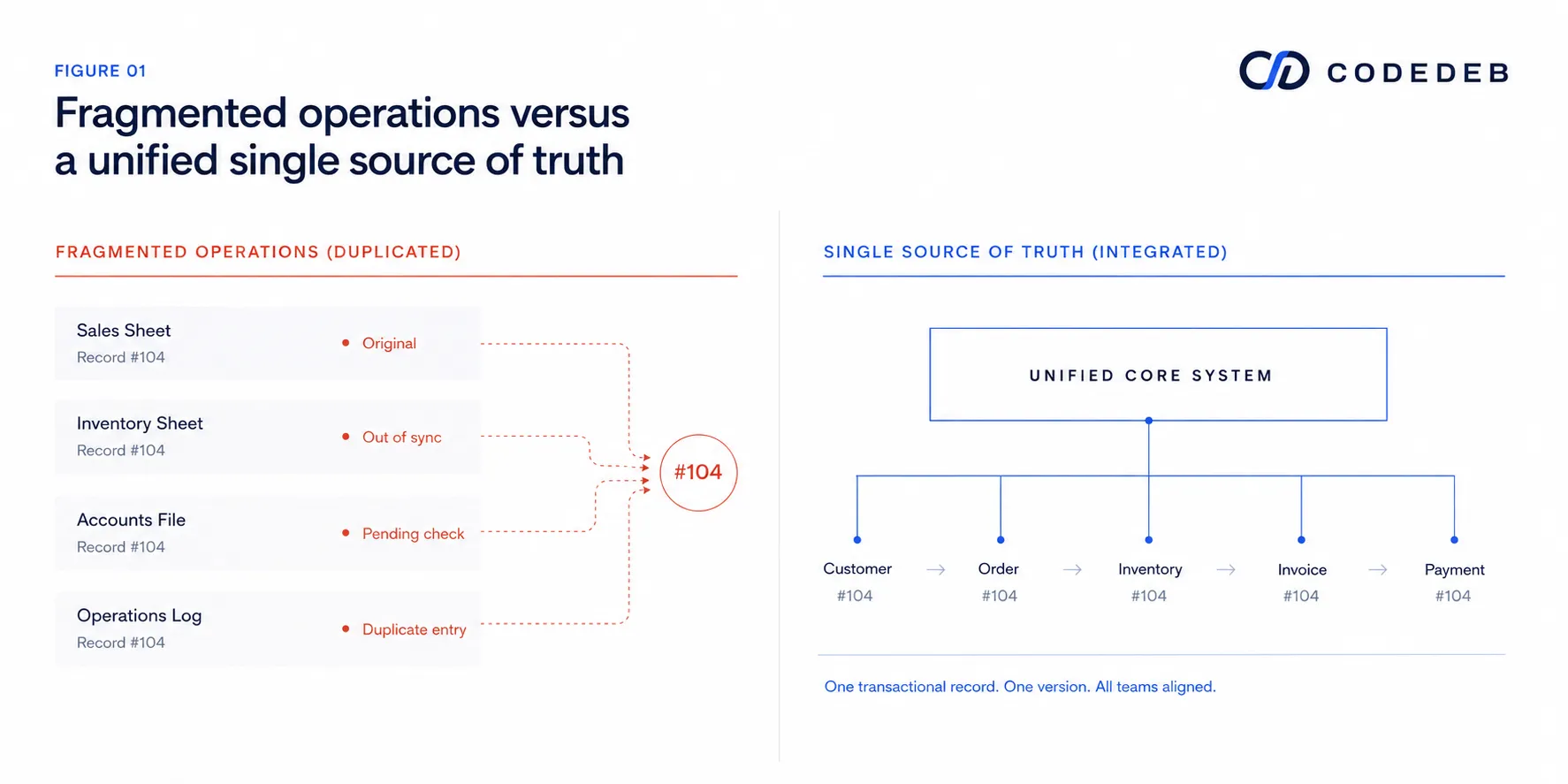
When a business lacks a unified software architecture, data entry ceases to be a single action and becomes a recurring administrative tax. Consider the lifecycle of a single wholesale B2B order under spreadsheet administration:
- A field sales representative records the customer's order in a personal spreadsheet or mobile note.
- The order details are re-typed into a master sales log by an administrative assistant.
- The warehouse manager manually updates a separate stock workbook to reserve inventory.
- The accounting team re-enters the transaction into legacy billing software or a financial sheet to generate a Tax Invoice.
- The dispatch team logs delivery details in a logistics tracking sheet.
In this workflow, the same customer name, item SKU, quantity, and price are manually transcribed five separate times by five different employees. Each manual transcription introduces a non-zero probability of human error, such as a mistyped SKU, a transposed digit in a PAN number, or a missing row. More fundamentally, each spreadsheet maintains its own isolated representation of reality.
Spreadsheet error rates are empirically measurable
Business leaders frequently assume that spreadsheet discrepancies are caused by individual staff carelessness. However, academic research into operational spreadsheet audit logs demonstrates that errors are structural to human interaction with unconstrained grids.
In a comprehensive review of operational spreadsheet literature, researchers Powell, Lawson, and Baker examined error prevalence across corporate workbooks. Their findings indicated that formula-cell error rates in audited operational spreadsheets consistently fall within the 0.8% to 1.8% range across evaluated operational models.[1]
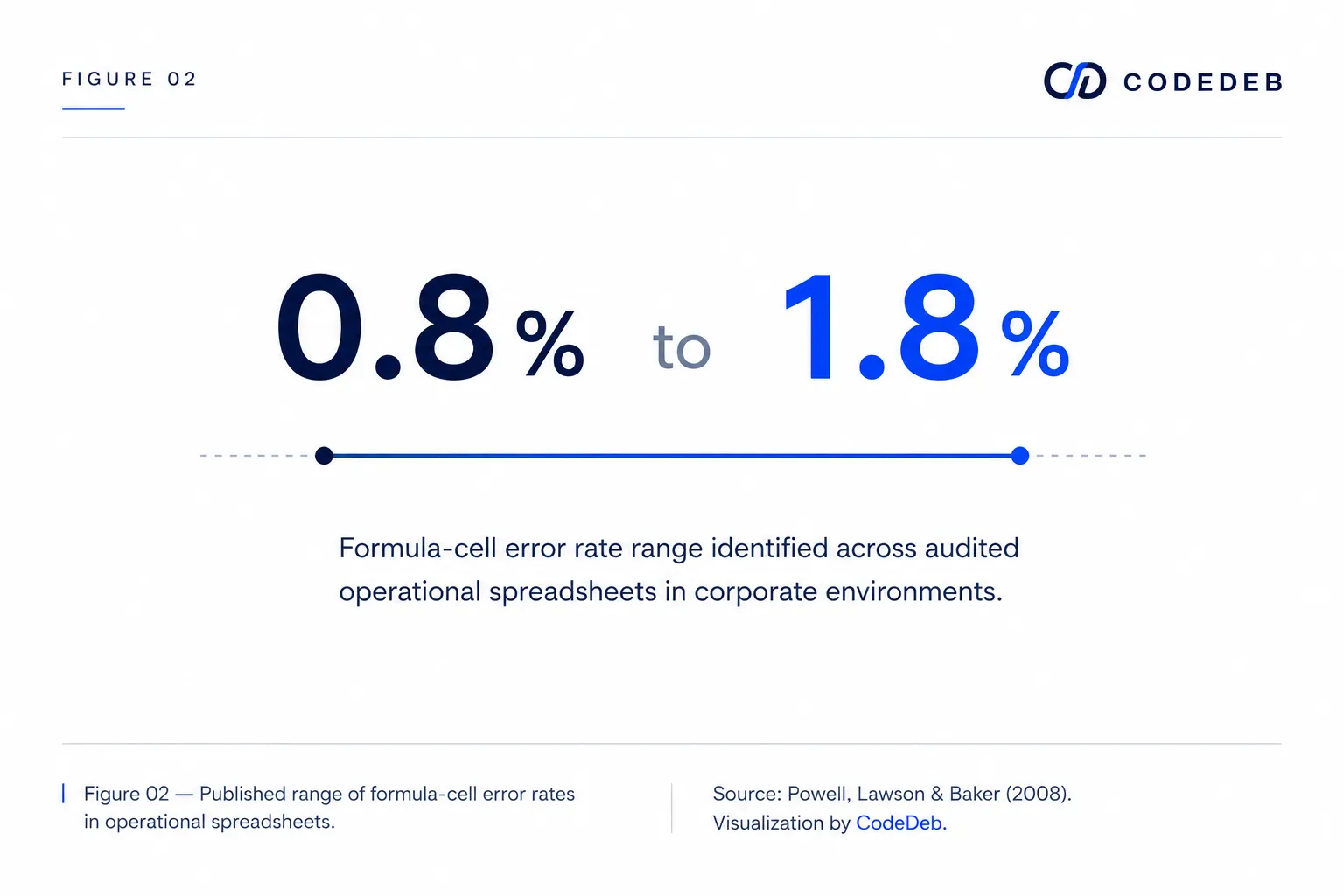
While a 1.5% cell error rate might sound trivial on a 20-row budget calculation, its effect is catastrophic in an operational sheet containing 5,000 formulas linked across multiple tabs. A single overwritten cell or broken cell reference silently corrupts financial margin calculations, leading to mispriced contracts or uncollected accounts receivable that go unnoticed for quarters.
Five operational symptoms that signal spreadsheet failure
Organizational readiness for custom software is rarely dictated by employee headcount alone. It is revealed by administrative friction. Five specific symptoms indicate that spreadsheets have reached their operational limit:
- Redundant data entry across departments: Staff spend hours copying data from physical vouchers, emails, or PDF invoices into separate departmental sheets.
- Month-end reporting requires manual reconciliation: Leadership cannot view financial or inventory reports until accountants spend days manually matching transactions across sheets.
- Key-person dependency on "master files": The entire company's operational workflow depends on one specific manager who understands the complex macros and hidden formulas of a master workbook.
- Role permissions handled by file-level passwords: Sensitive margin data, salary details, or customer contact lists cannot be restricted by granular user roles, exposing critical business data.
- Inability to answer simple operational questions instantly: Executive management cannot immediately determine current stock availability, total outstanding customer credit, or daily branch turnover without requesting manual consolidation.
Designing for the reality of Nepali business environments
Building custom software for organizations in Nepal requires catering to distinct operational constraints rather than copying Western SaaS defaults wholesale. Local business workflows often involve decentralized branch networks, mixed cash and digital payment channels (such as Fonepay and bank transfers), complex credit management practices, and strict IRD (Inland Revenue Department) VAT/PAN billing requirements.
Software designed for local deployment must handle these real-world realities seamlessly: maintaining offline capabilities for internet interruptions, providing fast localized search across thousands of records, and generating compliant tax invoices without requiring complex third-party add-ons.
When NOT to build custom software
Custom software is a significant strategic investment, and it is not always the correct choice. Organizations should avoid custom development under specific conditions:
- The operational workflow is standardized: If your company's core process matches standard accounting or payroll rules, off-the-shelf SaaS solutions are more cost-effective.
- Internal operational processes are unstable: Software codifies process. If your operational rules change daily, custom software will lock in chaos rather than resolve it.
- No internal owner exists to drive adoption: Software projects fail when leadership purchases tools without appointing an internal operations champion to manage change.
The decision threshold for building custom software is not reaching 50 or 100 employees. The threshold arrives when administrative coordination costs begin growing faster than revenue, particularly when your brightest staff spend more time managing spreadsheet mechanics than serving customers.