
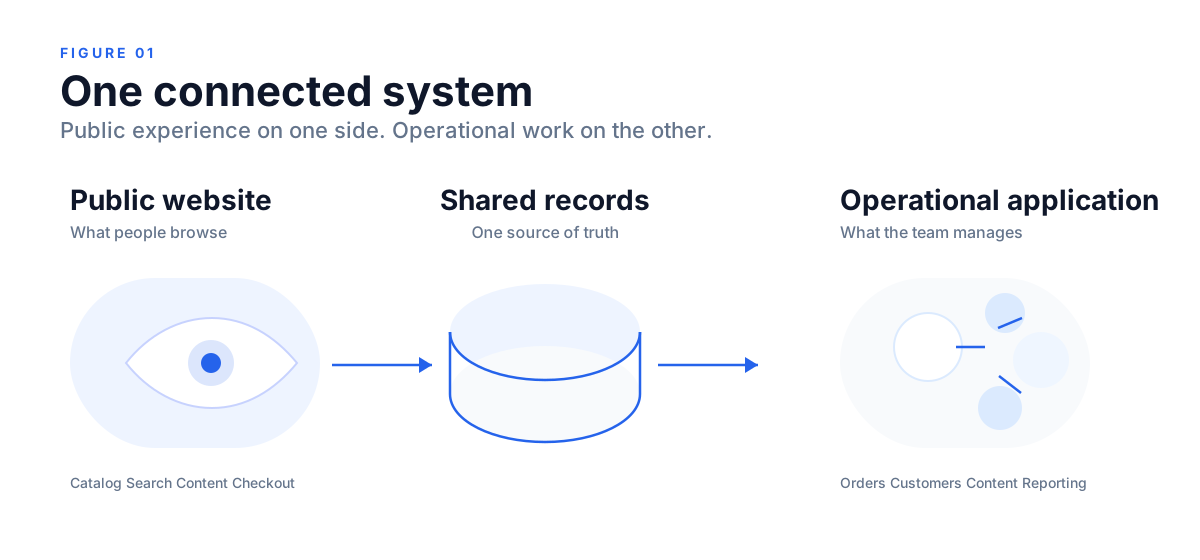
A website can look complete from the outside. People can browse products, read about the company, submit an enquiry, or even make a purchase. But that public experience is often only one side of the system.
Behind it, someone still has to manage products, stock, orders, customers, content, search metadata, permissions, and reporting. That work usually belongs in a web application.
This is why the usual “website versus web application” explanation is too shallow. In many real projects, the better question is: what should the public be able to see, and what should your team be able to do?
Core idea
Your customer may see a website, but your team may need an entire application behind it.
A website is the public layer. A web application is the working layer.
Both live in a browser. Both can use the same frontend stack, API layer, database, and cloud infrastructure. The difference is usually not the technology. It is the task.
Nielsen Norman Group describes the distinction in terms of user intent. Websites are commonly about navigating information, while applications are commonly about carrying out actions and commands. That remains useful even though modern systems often combine both.
A CMS proves the point clearly. Once an authenticated user logs in, edits pages, changes metadata, schedules publishing, moderates comments, or manages users, that person is using a web application. The public result may still be a website, but the control layer is software.
Ecommerce is the clearest example
An ecommerce business makes the split obvious.
The public side is what customers use. They see product pages, search, categories, cart, checkout, account pages, articles, and promotions. That layer needs good information architecture, search visibility, and trust.
The private side is what the business uses. Shopify describes its Admin as the central hub for orders, products, customers, analytics, marketing, and settings. WooCommerce product documentation and its analytics documentation show the same operational pattern.
So an ecommerce platform is not just a website with a cart. It is usually a public storefront connected to an operational application.
What might sit behind the storefront?
- Catalog and stock for products, variants, availability, pricing, and media
- Orders and fulfilment for payment status, dispatch, returns, and internal workflow
- Customers for profiles, addresses, purchase history, and support context
- Content and SEO for landing pages, blogs, metadata, redirects, and FAQs
- Operations for roles, permissions, audit history, dashboards, and exports
That is the difference between a strong public website and a workflow-driven web application. Many ecommerce businesses need both.
Nepal’s payment layer already supports this shift
Once money moves through the site, the operational side matters even more.
Nepal Rastra Bank reported 26,765,660 wallet accounts and 27,741,284 mobile banking users in Asar 2082, along with 40,236,413 QR transactions and 196,326 e-commerce payment transactions in the same reporting period. These are indicators, not unique-person counts, but they still show that digital transaction infrastructure is already part of how business works.
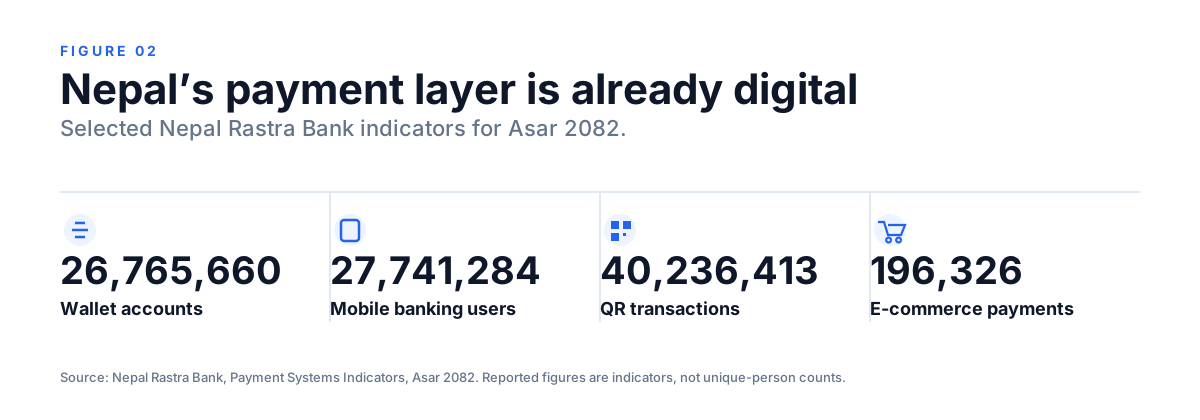
Checkout is only one step. A completed payment still has to update an order, affect stock, notify the right people, support reconciliation, and appear correctly in reporting. That is application logic, not just page design.
The same architecture shows up in other sectors
This is not only an ecommerce pattern.
- NGOs and INGOs: public programs, impact stories, and donation pages in front; member, donor, volunteer, event, and communications workflows behind
- Associations: public membership information in front; renewals, dues, directories, and registrations behind
- Schools and colleges: public courses, notices, and admissions information in front; applications, documents, enquiries, and portals behind
- Service businesses: public services and portfolio in front; leads, quotations, bookings, projects, and support behind
- Corporate or media sites: public company, reports, and articles in front; CMS, editorial workflow, approvals, and applications behind
WildApricot documents this pattern for membership organizations through member databases, renewals, events, payments, and website management. Salesforce Nonprofit Cloud shows the same operational model for nonprofit management, fundraising, programs, cases, and outcomes.
So, is a CMS a web application?
Usually, yes.
A CMS is the software used to manage the public experience. WordPress makes this explicit through roles and capabilities for administrators, editors, authors, contributors, and subscribers.
That matters because many businesses say they need “a website” when they actually need a website plus an admin system for content, products, SEO, enquiries, applications, campaigns, or staff workflows.
When a website is enough
A focused website is often enough when the goal is simple.
- You primarily need search visibility, credibility, and public information.
- Your main conversion is a call, enquiry, form submission, or brochure-style lead.
- Your staff do not need custom roles, approval flows, or a shared operational record.
- A standard CMS already gives you enough control.
In that case, adding custom application architecture can increase complexity without improving the outcome.
When the website needs an application behind it
The case changes when the public site triggers an ongoing internal process.
- People log in and different users see different information.
- Records change over time through statuses, approvals, or workflows.
- Several people work on the same data and need one source of truth.
- Reports matter because the system must support analysis and decisions.
- Other systems must connect such as payments, email, CRM, ERP, inventory, or accounting.
If several of those are true, the conversation should move from “we need a better website” toward business software, web applications, or even broader ERP decisions.
That is also where our related guides on when spreadsheets stop scaling and whether to build, buy, or customize ERP software become relevant.
SEO still belongs to the public layer
Moving business operations into an application does not weaken SEO. In many cases, it makes the architecture clearer. Public pages remain crawlable and discoverable, while the operational area stays private.
Google Search Central recommends useful crawlable links so search engines can discover pages and understand relationships between them. That is why service pages, FAQs, and research articles should support each other through relevant internal links rather than existing as isolated pages.
Performance should also be measured. web.dev defines good Core Web Vitals thresholds as Largest Contentful Paint at 2.5 seconds or less, Interaction to Next Paint at 200 milliseconds or less, and Cumulative Layout Shift at 0.1 or less, assessed at the 75th percentile.
Frequently asked questions
Is an ecommerce website a web application?
Usually, parts of it are. The public storefront behaves like a website, while the customer account, checkout, order management, and merchant admin use application logic.
Is a CMS a website or a web application?
The public output is the website. The CMS behind it is a web application used to manage that output.
Can an existing website become a web application?
Often, yes. A team can keep the public site and add authentication, APIs, dashboards, data models, customer portals, or internal workflows behind it.
Do NGOs need web applications?
Not always. Small organizations may only need a good website and a standard CMS. The need grows once memberships, donations, volunteers, programs, applications, events, communications, or reporting become structured workflows.
Should we build both from the beginning?
Only if the workflow justifies it. Start with the smallest system that solves the real problem, but design the structure so the public website and the operational layer can grow together.
The real decision is where the work happens
A website is not automatically too simple, and a web application is not automatically the better investment. They solve different problems.
The useful question is not just “website or web application?” It is what should people see, what should people do, and which data has to connect both sides?
Sources & methodology
Product and workflow examples are based on public documentation from Nielsen Norman Group, Shopify, WooCommerce, WordPress, WildApricot, and Salesforce. Nepal payment figures use Nepal Rastra Bank's Payment Systems Indicators for Asar 2082. Performance and search guidance use web.dev and Google Search Central. External evidence is linked directly at the claim it supports.